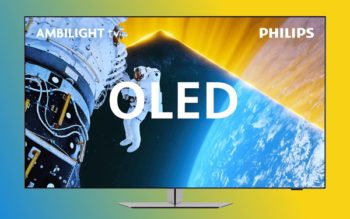
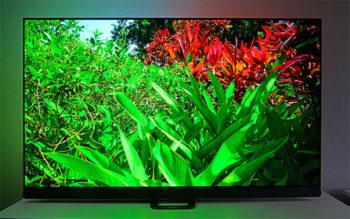
| Garantie LCD/Backlight (Jahre): | 2 |
| max. Pixelfehler (nach ISO 13406-2): | – |
| Panelgröße Zoll / cm: | 42 / 107 |
| Standardauflösung (Seitenverhältnis): | 1.920 x 1.080 (16:9) |
| Sichtbare Bildgröße/-diagonale [mm]: | – |
| Helligkeit [cd/m²]: | 500 |
| Kontrastverhältnis: | 80000:1 (dynamisch) |
| Lautsprecher: | 2 x 10 Watt (Incredible Surround) |
| Eingänge (jeweils ein Eingang, wenn nicht anders angegeben): | 4 x HDMI 1.3 (digital), 1 x D-Sub VGA (analog), 2 x SCART, 1 x Komponent, 1 x Video, 3 x Audio L/R (Cinch) 1 x USB 2.0 Anschluss, 1 x CI-Kartenslot, 1 x Antenne/Kabel, 1 x LAN Anschluss (DLNA 1.0) |
| Ausgänge: | 1 x Kopfhörerausgang (3,5 mm Klinkenstecker), 1 x Digial-Audio-OUT (koaxial) |
| Fernbedienung / Batterien: | Ja / Ja |
| TV drehbar / neigbar: | Ja / Nein |
| Wandhalterung: | VESA 400 |
| Zubehör: | Fernbedienung mit Batterien, Standfuß, Kurzanleitung, Handbuch, CD-ROM, Stromkabel |
| Gerätemaße (B x H x T) [mm]: | 996 x 655 x 260 (mit Fuß) |
| Gewicht [kg]: | 17,7 (ohne Fuß) / 20,5 (mit Fuß) |
| Prüfzeichen: | CE, ECO-Green |
| Leistungsaufnahme On/Stand-by/Off [Watt]: | normal 146 / < 1 / – (Herstellerangabe) |
Vorwort
Dieser Test entstand in Kooperation mit der kroatischen Internetseite HDTV.com.hr. Aus diesem Grund sind auf den Bildern, insbesondere bei den Menüeinstellungen, die Texte in kroatisch. Auch auf den bereitgestellten Videos sind die Erklärungen kroatisch.
Einleitung
Der Philips 42PFL8404H ist ein Vertreter der neuen 8000er Serie und besitzt als solcher einen MPEG4-DVB-Tuner für terrestrisches und für Kabelfernsehen. Um in den Genuss von Inhalten – sowohl in Standardauflösung als auch in High Definition – zu kommen, ist also kein zusätzlicher Receiver notwendig.
Kabelkunden können allerdings nach wie vor nicht auf ihre Smartcard verzichten: Um digitales Kabelfernsehen empfangen zu können, ist es nötig, diese in den CI-Plus-Schacht (Common Interface) an der Seite des Fernsehers einzustecken. Das geschieht mittels CAM-Adapter (Conditional Access Module).
Neben der Vielfalt der empfangbaren Fernsehstandards unterstützt die neue Serie zusätzlich den NetTV-Dienst. Er ermöglicht direkten Zugriff auf das Internet sowie auf eine große Auswahl an Diensten – und zwar ohne den Computer zu Hilfe zu nehmen. Der USB-Anschluss schließlich, welcher verschiedene Video- und Audioformate unterstützt, ist das Sahnehäubchen in Sachen Ausstattung.
Ob der Philips 42PFL8404H die bei solcher Ausstattung geweckten Erwartungen erfüllen kann, und wie sich seine Bildqualität beurteilen lässt, das lesen Sie in unserem Test.

Der Philips 42PFL8404H bringt darüber hinaus folgende bildverbessernden Optionen mit:




· Pixel precise HD
· HD Natural Motion
· Ambilight Spectra 2
· 3:2- bis 2:2-Bewegungs-Pull-Down
· 3D-Kammfilter
· Active Control und Lichtsensor
· Digitale Rauschminderung
· Dynamische Kontrastoptimierung
· Verbesserter Leuchtdichtenübergang
· Progressive Scan
· 2D-/3D-Rauschreduzierung
· 100-Hz-Technik
Lieferumfang
Die Kartonverpackung des 42PFL8404H hat die Abmaße von 1.203 x 266 x 682 Millimetern und besitzt das für Philips typische Layout. Deutlich weist der Karton auf die Bildschirmdiagonale von 107 Zentimetern hin. Darüber hinaus lassen die philipstypischen Aufschriften keinen Zweifel daran, dass der Inhalt zur 8000er Serie gehört.
Der Hersteller bewirbt das Modell mit dem Slogan „Genießen Sie einen Filmabend mit Ambilight“, und diese Technologie möchten wir später etwas ausführlicher betrachten. 24 Kilogramm bringt der Fernseher samt Zubehör und Verpackung auf die Waage; wie er aus dem Karton zu nehmen ist, wird auf der Oberseite der Verpackung beschrieben.

Problemlos gelangten wir an den Inhalt der Verpackung, zu dem zählen: Der Philips 42PFL8404H LCD-TV nebst Standfuß und vier Befestigungsschrauben. Ohne den Standfuß, dessen Abmaße 510 x 260 mm betragen, hat das Gerät folgende Dimensionen: 996 x 602,5 x 88 mm.
Bei montiertem Standfuß erhebt sich das Panel auf insgesamt 655,5 Millimeter. Zwei beiliegende Batterien des Typs AAA + Philips Longlife sind für die Fernbedienung vorgesehen. Weiterhin enthalten sind: ein Stromkabel, die Starthilfeanleitung, eine Broschüre über die NetTV-Dienste, die Bedienungsanleitung in gedruckter Form und auf CD.

Umhüllt von einer Schutzfolie, steckt das Panel gut geschützt zwischen zwei Styroporprofilen, sodass es während des Transports keinen Schaden nehmen kann.

Nach dem Auspacken ziehen wir die schützende Klebefolie von der Hochglanzoberfläche aus Plastik ab. Gleiches muss am Standfuß geschehen, der sich übrigens ganz einfach mit der Rückseite des Fernsehers verbinden lässt. Den Philips 42PFL8404H aufzubauen, ist ziemlich unkompliziert – dennoch empfehlen wir, sicherheitshalber die Anleitung einmal durchzublättern.


Optik und Verarbeitung
Wahrhaft großartig, so lässt sich die Optik des Philips Großbildfernsehers beschreiben. Glänzendes Plastikschwarz auf jedem Quadratzentimeter des von vorn sichtbaren Rahmens, nicht gestört von Aufklebern mit den Spezifikationen des Fernsehers. Lediglich in der Mitte prangt silbern der Herstellername. Eine kleine LED darunter leuchtet im Betrieb weiß, während der Standby-Modus mit rotem Licht signalisiert wird. Zur Rechten und zur Linken der Leuchtdiode befinden sich Infrarotempfänger für die Fernbedienung und den Leuchtsensor.

Rund um das schwarze Gehäuse verläuft ein zweiter, transparenter Rahmen, der im Verhältnis zum eigentlichen Rahmen etwas größer ist. Dort, wo sich der transparente Rahmen an der Unterseite einige Zentimeter vom Gehäuse löst, befindet sich die Philips-Tonanlage. Die kleinen, von außen unsichtbaren Lautsprecher besitzen lediglich eine Gesamtleistung von zwei mal zehn Watt – ob das genügt, werden wir ebenfalls überprüfen.

Einige vertikal an der rechten Seite angeordnete Tasten lösen grundlegende Befehle aus: Sie passen die Lautstärke an, schalten zwischen den Kanälen um und wählen das Eingangssignal aus. Schließlich gibt es noch einen Ein- und Ausschaltknopf.


Anschlüsse


Insgesamt vier HDMI-Anschlüsse erfüllen unsere Erwartungshaltung an ein HDTV-Gerät der neueren Generation. Hinzu gesellen sich Composite- und Komponenteneingänge, ein Ethernetanschluss (RJ45) sowie ein USB-Eingang. Der bereits angesprochene Common-Interface-Steckplatz beherbergt bei Bedarf CAM-Adapter und Smartcard fürs digitale Kabelfernsehen. Weitere Empfangsarten realisiert Philips, indem es den 42PFL8404H mit einem digitalen terrestrischen und einem analogen Kabeltuner ausstattet.