
Die Frage nach einem entsprechenden Diebstahlschutz stellt sich spätestens dann, wenn das eigene Equipment auf einer LAN-Party zum Einsatz kommt. In den eigenen vier Wänden wird wohl weniger der einzelne Gegenstand, als vielmehr die gesamte Wohnung gesichert.
Etwas anders sieht es beispielsweise in öffentlichen Gebäuden, Schulen, Firmen, Elektronikgeschäften oder Internet-Cafés aus. Ohne entsprechende Sicherheitsmaßnahmen könnte man zu leicht einen Monitor, einen Beamer oder einen Desktop-PC stehlen. Doch wie kann dieser Diebstahlschutz konkret aussehen?
Natürlich kann man durch Bewegungsmelder, Alarmanlagen und Sicherheitspersonal jedes Objekt entsprechend schützen und ein Haus in Ford Knox verwandeln. Darum soll es in diesem Artikel nicht gehen. Wir wollen zeigen, wie Sie Ihren Monitor mit wenigen Hilfsmitteln vor dem spontanen Zugriff schützen können.
Die wohl einfachste Art seinen Monitor zu schützen, sind diverse Stahlkabel, die am Gerät selbst und an einem stabilen Punkt befestigt werden. Im Fachhandel sind verschiedene Lösungen erhältlich. Die bekannteste Sicherungsmethode stammt vom Hersteller Kensington.
Eine Vielzahl von Monitoren besitzen bereits den Kensington-Slot, der mit einem Kensington-Schloss zur Diebstahlsicherung für mobile Hardware wie Notebooks, Beamer, Projektoren und LCDs geeignet ist. Dabei befestigt man die Schlaufe an einem festen Punkt, wie z.B. einem Heizkörper oder dem Fuß eines Schreibtisches. Das Schloss kommt in den Kensington-Slot und wird mit dem Schlüssel verriegelt.
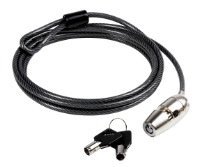
Der Nachteil einer solchen Sicherung liegt darin, dass es entscheidend ist, ob die Befestigung des Sockels im Monitor aus Plastik oder aus Metall besteht. Die zweite Variante wäre entscheidend besser, weil bei der Plastik Variante das Schloss relativ einfach aus dem Gehäuse gebrochen werden kann. Allerdings stellt auch das 3 mm Stahlseil bei entsprechendem Werkzeug (Bolzenschneider) keine ernsthafte Sicherung dar. Trotzdem wird eine Entwendung deutlich erschwert.




Doch auch wenn Ihr Monitor kein Kensington Slot besitzt, hat die Firma Kensington eine Lösung parat. Spezielle Befestigungen werden mit einem Spezialkleber am entsprechenden Gegenstand befestigt. Danach werden verschiedene Komponenten wie Monitor, Drucker und PC miteinander verbunden, um den Abtransport zu erschweren.
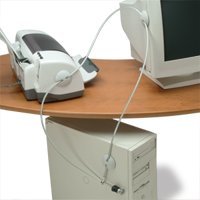
Ein weiteres System von Kensington ist der „MicroSaver Alarmed Lock“ (Schloss mit Alarmfunktion). Es ist ebenfalls für alle Geräte nutzbar. Der Alarm wird ausgelöst, sobald das Kabel durchtrennt wird. Er soll bis zu 50 Fuß weit hörbar sein. Praktischerweise kann man den Alarm ausschalten, wenn man ihn nicht braucht.

Wer keinen Kensington-Slot an seinem Gerät vorinstalliert findet, kann mit Hilfe eines Spezialklebers und einem Sockel nachhelfen.
Nähere Informationen finden sie unter www.kensington.com.

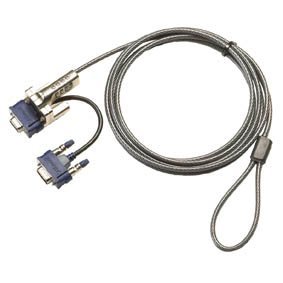
Ein ähnliches Sicherheitssystem bietet die Firma Targus mit ihrem Produkt DEFCON® VPKL (Video Port Key Lock ) an. Auch hier kommt eine Kombination aus Stahlkabel und Schloss zum Einsatz. Es handelt sich dabei um einen Adapter mit Grafikkabel und Drahtseil. Der Adapter wird am VGA-Eingang des Monitors verschraubt und per Schloss gesichert. Das Stahlseil wird an einem möglichst schweren Gegenstand befestigt. Abschließend wird die Verbindung zur Grafikkarte per Monitorkabel hergestellt.
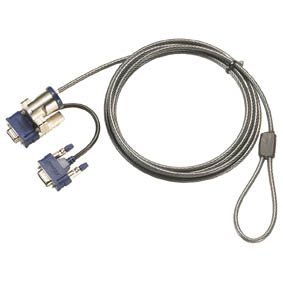
Das DEFCON® VPCL ist eine weitere Alternative, besitzt allerdings kein Schlüsselsystem, sondern nutzt ein vierstelliges Zahlenschloss zur Absicherung. Nähere Informationen finden sie unter www.targus.com.
Es besteht ebenfalls die Möglichkeit den Bildschirm mit einer PIN an die Grafikkarte zu koppeln, somit kann man den Diebstahl zwar nicht verhindern, doch mit hoher Gewissheit leben, dass der Dieb den Monitor nicht verwenden kann. Das schon etwas ältere Modell Hyundai 90D hat diesen Sicherheitsmechanismus zum Beispiel integriert.
Zur besseren Identifizierung sollten Sie Ihren Monitor an einer nicht sichtbaren Stelle entsprechend kennzeichnen, denn eine aufgeklebte Seriennummer ist schnell entfernt und durch eine neue ersetzt. So können Sie Ihr Eigentum schnell identifizieren.




Wem all dies nicht reicht, sollte für sein Zuhause die Installation einer Alarmanlage mit integriertem Bewegungsmelder in Betracht zeihen. Diese kann Bewegungen in seinem Umfeld erkennen oder auch auf Lichtquellen reagieren.
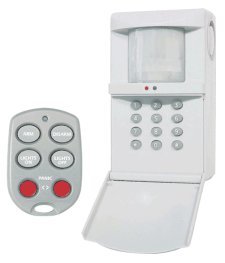
Auch Alarmgeräte die den Kontakt zwischen Gerät und Steckdose überprüfen, sind sinnvoll, da an diesen kein Weg vorbei führt. Sobald der Netzstecker gezogen wird, meldet sich der Alarm. Damit ist diese Methode praktisch für alle elektronischen Geräte nutzbar.
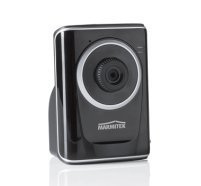
Wer genau wissen will, was in seinen Räumen passiert, kann Überwachungskameras installieren. Diese versenden mittels eigenem Webserver Bilder periodisch oder bei Bewegung, an ihre E-Mail-Adresse. Nähere Informationen finden sie unter www.marmitek.com.
Keines der hier vorgestellten Systeme kann einen Diebstahl zu 100 Prozent verhindern, dennoch erschwert es Langfingern Beute zu machen. Welches System für welche Umgebung am geeignetsten erscheint, hängt vom Wert der zu sichernden Gegenstände ab und natürlich vom Budget. Abschreckend wirken jedenfalls alle Methoden.
gefällt es














